Artificial intelligence is no longer just “answering questions in a chat box.”
With AI agents, you can now build digital teammates that read data, make decisions, and take action across your tools.
The best part?
You don’t need to wait for some future release.
You can build powerful, practical AI agents today with existing APIs and frameworks.
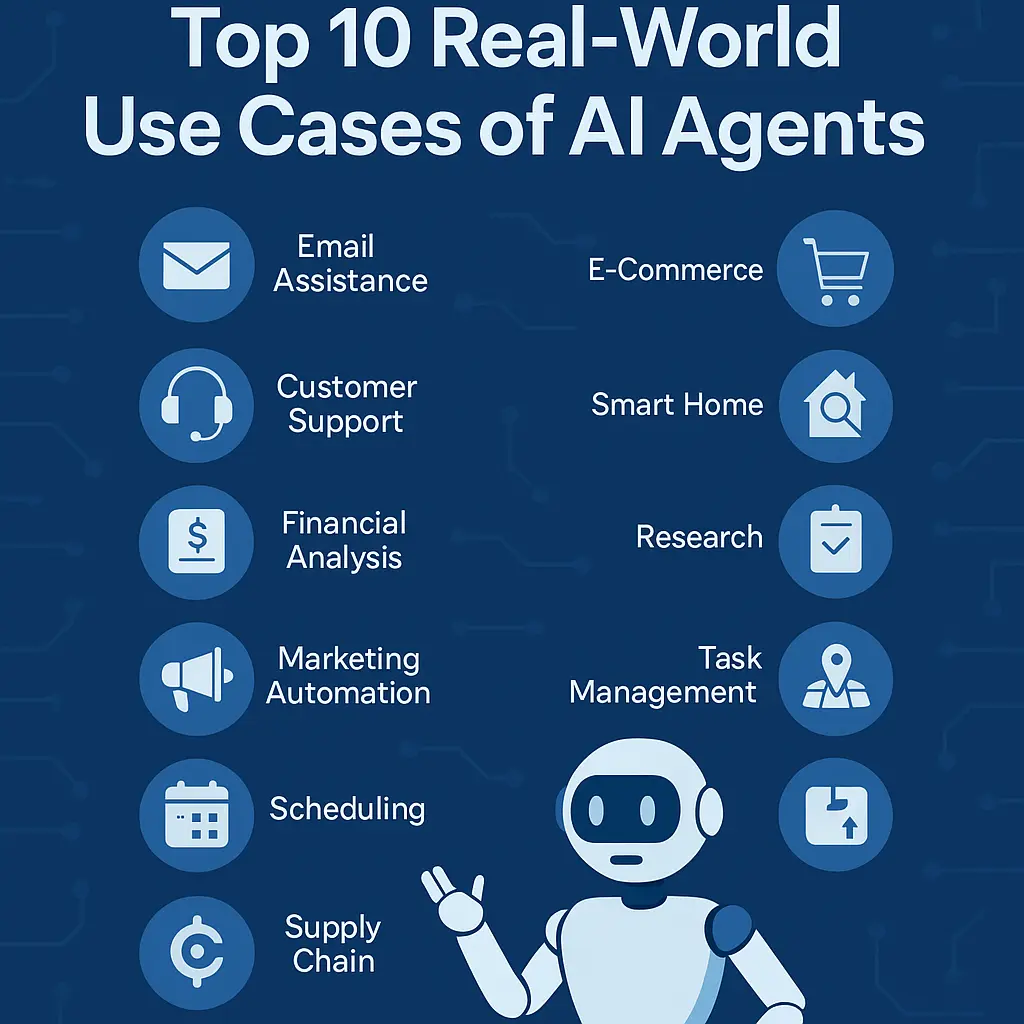
Here are 10 real-world AI agent use cases you can start implementing right now.
1. Email & Inbox Triage Agent
Your inbox is full of:
- Newsletters
- Client emails
- Internal threads
- Spam
- “Can you just…” messages
An email agent can:
- Read new emails as they arrive
- Classify them (urgent, important, low-priority, spam, FYI)
- Draft replies for common patterns (meeting request, document request, follow-up)
- Flag or pin messages that truly need your attention
- Generate a daily summary of “What matters today”
You still stay in control—but instead of staring at 150 unread emails, you just review a clean shortlist and a few drafts.
Technical Insight: Hook into Gmail/Outlook APIs, stream messages into an LLM-powered classifier, then use tool calls to label, star, or draft replies. Start with read-only (classification + drafts) and gradually allow automated actions for low-risk cases (e.g., archiving newsletters).
2. Lead Generation & Enrichment Agent
Sales teams lose hours every week:
- Searching LinkedIn, Google, and company sites
- Copy-pasting details into CRM
- Figuring out which leads are actually worth calling
A lead-gen agent can:
- Take a high-level description like “Indian SaaS startups doing B2B”
- Scrape relevant sites and directories
- Extract names, roles, company info, links, and contact details (where public)
- Enrich with signals like headcount, tech stack, job postings, or funding
- Score and prioritize leads
- Add them directly into your CRM or a Google Sheet
Technical Insight: Use a search API + scraping tool + LLM for structured extraction (JSON). A simple scoring formula (ICP match, geography, size, activity) can rank leads. The agent then writes to the CRM via API, tagging each lead with source and score.
If you want to learn real time agents visit BotCampusAi-Workshop
3. Customer Support Tier-1 Resolution Agent
Most support tickets are repetitive:
- “Where is my order?”
- “I can’t log in.”
- “I want a refund.”
- “Can you resend my invoice?”
A support agent can:
- Read incoming tickets or chats
- Classify intent and urgency
- Look up order/account details via API
- Suggest or execute safe actions (password reset, resend confirmation, check tracking, generate invoice)
- Reply with a natural, human-style message
- Escalate complex or risky cases with a clean summary
This doesn’t replace your team—it frees them to focus on edge cases and high-value customers.
Technical Insight: Combine a helpdesk API (Zendesk, Freshdesk, Intercom, etc.) with an LLM that’s grounded by your knowledge base (RAG). Define a whitelist of allowed actions (reset, resend, check status) and require human approval for refunds or policy exceptions.
4. Invoice, Expense & Finance Agent
Finance teams get buried under:
- PDF invoices
- Expense receipts
- CSV exports from banks and payment gateways
A finance agent can:
- Watch a folder (Drive/Dropbox) or email inbox for new invoices
- Extract vendor, date, line items, tax, and totals
- Categorize expenses (SaaS, marketing, travel, salaries, etc.)
- Match payments to invoices
- Update your accounting system or Google Sheet
- Generate weekly/monthly spend summaries by category
Technical Insight: Use document parsing APIs (PDF/OCR) plus LLM-based extraction into a fixed schema. A classification model (or prompt-based classifier) assigns categories. The agent then writes to tools like Xero/QuickBooks via API, or to Sheets/Notion for simple setups.
5. Meeting Notes & Action-Item Agent
Meetings generate:
- Ideas
- Decisions
- Action items
- Owners and deadlines
…which usually vanish after the call.
A meeting agent can:
- Record or receive transcripts from Zoom/Meet/Teams
- Summarize the discussion
- Extract decisions, open questions, and action items
- Tag owners and due dates
- Create tasks in tools like Asana, ClickUp, Notion, or Jira
- Email or Slack the summary to all participants
Technical Insight: Feed call transcripts into an LLM with a structured output prompt (summary, decisions, action_items[]). Then map action_items to your task manager’s API. The agent can also cross-check participants against your directory to tag the right owners.
6. Social Media Content & Scheduling Agent
Most creators and brands struggle with:
- Idea generation
- Consistency
- Repurposing content across platforms
A social media agent can:
- Take a theme or campaign goal
- Generate post ideas, hooks, and captions for LinkedIn, Instagram, X, etc.
- Adapt tone per platform
- Propose a weekly content calendar
- Schedule posts via Buffer, Hootsuite, or platform APIs
- Analyze performance and suggest what to double down on
Technical Insight: Use the LLM for ideation + copywriting, then connect to publishing tools through APIs. A recurring job (daily/weekly) lets the agent review metrics (impressions, clicks, saves, comments) and adjust future topics or formats based on what works.
7. Sales Pipeline & Follow-Up Agent
CRMs are full of:
- Half-filled deals
- Forgotten tasks
- Leads with no follow-up
A pipeline agent can:
- Scan your deals and activities in the CRM
- Identify stale leads with no touch in X days
- Draft personalized follow-ups based on past emails and notes
- Suggest next-best actions per deal
- Update stages when replies come in
- Send you a daily “Here are 10 deals to act on today” brief
Technical Insight: Use CRM APIs (HubSpot, Pipedrive, Salesforce, etc.) as the agent’s main environment. An LLM generates follow-up emails using prior conversation history. You can start with “draft mode” (save drafts in CRM) and later allow auto-send for low-risk segments.
8. Internal Knowledge & SOP Agent
Teams drown in documents:
- SOPs
- Confluence pages
- Google Docs
- Slack threads
No one remembers where anything is.
A knowledge agent can:
- Index internal docs, wikis, and FAQs
- Answer “How do we…?” questions with precise, cited answers
- Generate step-by-step checklists based on SOPs
- Suggest improvements when it detects outdated or conflicting content
- Route edge cases to the right human expert
Technical Insight: Build a RAG (retrieval-augmented generation) stack: store embeddings of your content in a vector database, retrieve the most relevant chunks, and let an LLM compose answers with citations. The agent can also propose updated text when users flag something as outdated.
9. Research & Insight Report Agent
Whether you’re a founder, marketer, or analyst, research can eat days:
- Market landscapes
- Competitor analyses
- Trend reports
- Tool comparisons
A research agent can:
- Take a prompt like “Compare top AI email tools for small agencies”
- Search the web, scrape key pages, and extract structured data (features, pricing, pros/cons)
- Group and rank alternatives
- Generate a concise report or slide outline
- Keep a workspace updated as new info appears
Technical Insight: Combine web search APIs, scraping, and LLM-based extraction to populate a structured dataset. Then ask the LLM to generate different views: executive summary, long-form report, pros/cons table. Always keep raw sources stored for manual verification.
10. Personal “Life OS” Agent
On the personal side, you juggle:
- Tasks in different apps
- Bills and subscriptions
- Health goals
- Learning plans
A personal agent can:
- Aggregate tasks from email, notes, and apps into one daily list
- Track upcoming bills, renewals, and deadlines
- Suggest time blocks on your calendar
- Help you plan learning (e.g., “3 hours/week on ML”) and propose weekly micro-goals
- Generate a weekly review of what you did and what slipped
Technical Insight: This is a multi-tool agent: calendar API, task manager API, email API, plus a local database for your preferences and rules. A recurring schedule (e.g., every morning and Sunday night) triggers planning and review cycles, with the LLM orchestrating recommendations.
Conclusion: Start Small, But Start Now
You don’t need a huge engineering team to start using AI agents.
Pick one of these:
- Inbox triage
- Lead enrichment
- Tier-1 support
- Meeting notes
- Social content
- Finance automation
Build a small, safe version:
- Read data
- Propose actions (draft only)
- Let a human approve
- Gradually unlock automation where it’s low risk
Over time, you’ll stop thinking of “AI” as a single chatbot and start seeing it as a network of agents quietly running your operations in the background.
If you’d like more step-by-step guides, prompts, and architectures for building these agents, keep an eye on
BotCampusAI — we’ll keep sharing practical, buildable examples you can plug into your own workflows.