Artificial intelligence (AI) models are incredibly good at generating text—but they have a big problem:
They don’t actually know your data.
Out of the box, a model like GPT doesn’t know:
- Your internal documents
- Your course content
- Your support tickets
- Your product pricing
- Your Notion / Confluence / Google Drive knowledge base
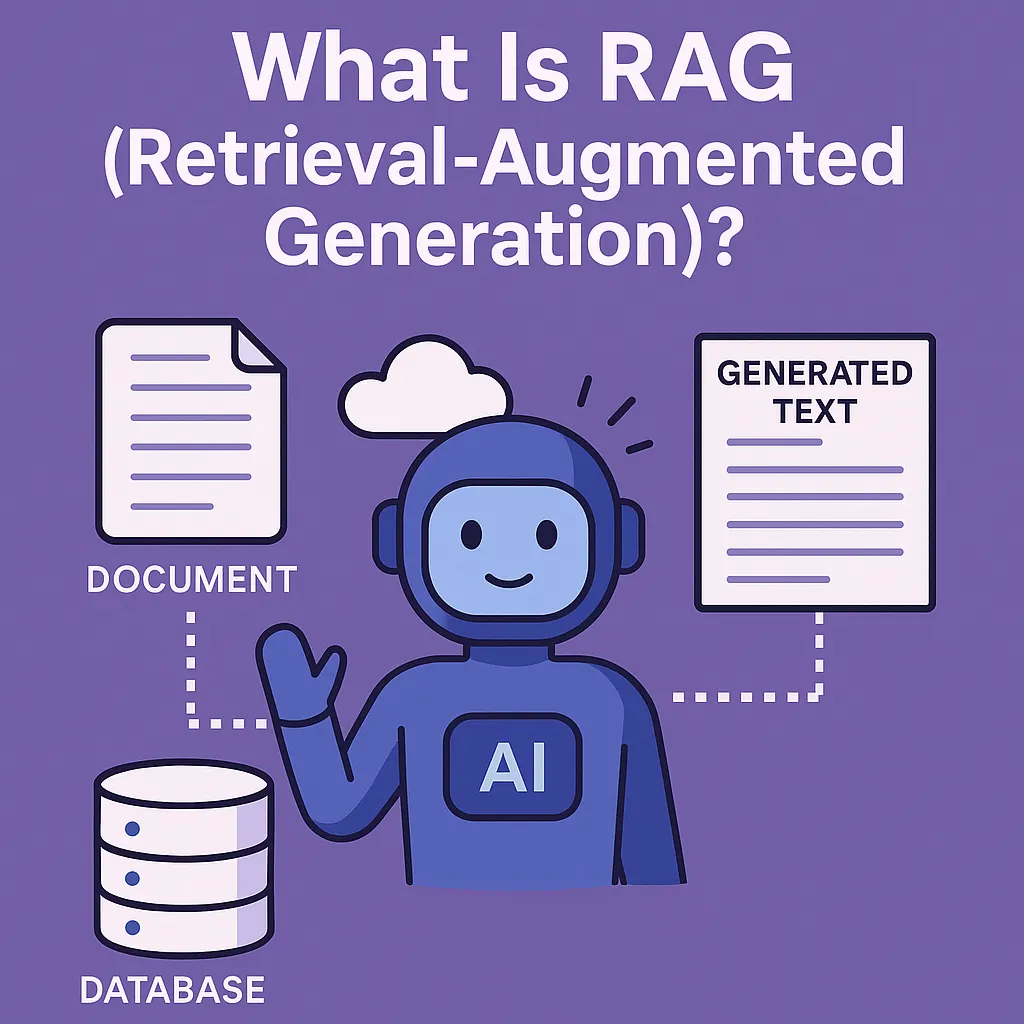
This is exactly what RAG – Retrieval-Augmented Generation is designed to fix.
In this guide, you’ll learn:
- What RAG is (in plain language)
- Why we even need it
- How a RAG pipeline really works
- The key components (chunking, embeddings, vector DBs, retrievers, LLM)
- Real-world use cases
- Common pitfalls and how to avoid them
- How to get started as a beginner
1. What Is RAG?
RAG (Retrieval-Augmented Generation) is a technique where an AI model:
- Retrieves relevant information from your own data
- Augments the prompt with that information
- Generates an answer using both its general knowledge and your specific content
So instead of asking the model:
“What’s in my company’s refund policy?”
…you first fetch the relevant paragraphs from your policy docs and then ask the model:
“Based on the following policy excerpts, answer the user’s question.”
That way, the model isn’t guessing. It’s reading.
Simple analogy:
RAG is like an open-book exam.
The LLM is the student, your documents are the textbook, and “retrieval” is flipping to the correct page before answering.
Technical Insight: Without RAG, the LLM relies only on its pre-training and fine-tuning. With RAG, you inject fresh, domain-specific context at inference time. This means you can keep your model smaller and more general, while pushing your private/custom knowledge into the retrieval layer instead of retraining the model.
2. Why Do We Need RAG?
LLMs are powerful—but they have three big limitations:
- Stale knowledge
-
- They were trained on data up to some cut-off date.
- They don’t know your latest policies, pricing, features, or news.
1.No access to private data by default
-
- They can’t see your Google Drive, CRM, or support docs unless you explicitly connect them.
2. Hallucinations
- When they don’t know something, they may confidently “make it up.”
RAG attacks all three problems:
- You control what data is available to the model at query time
- You can update or add documents without retraining
- You constrain the model to answer based on retrieved evidence, which reduces hallucinations (when implemented well)
Technical Insight: Fine-tuning teaches the model new patterns; RAG feeds the model facts at runtime. Usually, you don’t need to fine-tune just to “teach” the model your docs—RAG is cheaper, more flexible, and easier to keep up-to-date.
Want to learn RAG Visit BotCampusAi-Workshop
3. How RAG Works: Retrieve → Augment → Generate
A basic RAG pipeline looks like this:
-
User query
“Can I get a refund if I cancel my subscription after 10 days?”
-
Retrieve relevant passages
- Search your document store (e.g., refund policy, terms of service)
- Return the top N chunks of text that look relevant
-
Augment the prompt
-
- Build a prompt that includes:
- The user’s question
- The retrieved text snippets
- Example (simplified):
- Build a prompt that includes:
“You are a support assistant. Use ONLY the policy text below to answer.
Policy:
[chunk 1]
[chunk 2]Question: Can I get a refund if I cancel after 10 days?”
- Generate the answer
-
- The LLM reads the policy chunks + question
- It generates a grounded answer based on the provided text
Technical Insight: RAG is not just full-text search + GPT. The magic comes from semantic retrieval (using embeddings) and carefully structured prompts. The model is guided to rely on the retrieved context instead of its own guesses, and often asked to quote or reference the source text.
4. Key Components of a RAG System
A RAG setup has a few essential building blocks:
4.1 Data Sources
Where your knowledge lives:
- PDFs, Word docs, Google Docs
- Knowledge base articles, wikis, Notion pages
- Database records, FAQs, Slack exports
- Website pages, blog posts, support macros
These need to be ingested and prepared.
4.2 Chunking
Documents are usually too big to feed to the model as-is.
So you split them into chunks (small pieces of text).
Examples:
- 500–1,000 characters
- 100–300 tokens
- Paragraph-level or section-level chunks
Good chunking:
- Keeps each chunk internally coherent (no mid-sentence cuts)
- Balances detail and size so retrieval is accurate but context windows aren’t overloaded
Technical Insight:
Chunking is a trade-off:
- Too small: many chunks needed, context gets noisy.
- Too large: retrieval becomes fuzzy (irrelevant stuff attached).
Sliding windows and overlap (e.g., 200-token chunks with 50-token overlap) often improve continuity.
4.3 Embeddings
Each chunk is turned into a vector (a list of numbers) using an embedding model.
- Similar text → similar vectors
- Dissimilar text → distant vectors
This is how the system can find semantically related content, not just keyword matches.
4.4 Vector Database (Vector Store)
You store all your chunk embeddings in a vector database:
- Examples: Pinecone, Weaviate, Qdrant, Milvus, Chroma, pgvector, etc.
- The DB lets you quickly query:
“Give me the top 5 chunks most similar to this query embedding.”
4.5 Retriever
The retriever is the part that:
- Converts the user’s query into an embedding
- Searches the vector DB
- Returns the top-k chunks (e.g., 3–10)
This is the “R” in RAG: retrieval.
4.6 LLM (Generator)
The generator is your language model (GPT, etc.).
It gets:
- The user’s query
- The retrieved chunks
And it’s prompted to produce a grounded answer.
Technical Insight: Many modern pipelines combine vector search with classic keyword search (BM25, Elastic, etc.). This is called hybrid retrieval and can improve performance, especially for short queries, specific terms, or numeric data.
5. Types of RAG (Beyond the Basics)
Basic RAG is: query → retrieve → answer.
But there are more advanced patterns:
5.1 Basic (Single-Hop) RAG
- One query → one retrieval step → one answer.
- Good for direct Q&A over docs.
5.2 Multi-Hop RAG
- Some questions require multiple pieces of information from different places.
- Multi-hop RAG does iterative retrieval:
- Retrieve once, reason
- Retrieve again with updated sub-queries
- Combine evidence
Example: “Compare our 2023 and 2024 pricing changes for enterprise plans.”
5.3 Structured / Tool-Augmented RAG
- Use tools (SQL, APIs) in addition to text.
- Example: Ask the LLM to:
- Query a database for numbers
- Retrieve docs for policies
- Then synthesize both in the answer
5.4 Conversational RAG
- Keep track of dialog history
- Use past turns + retrieved docs to answer follow-up questions
- Example:
- User: “Tell me about the refund policy.”
- Later: “What about annual plans?”
- The system remembers context and retrieves the right section.
Technical Insight: Advanced RAG often uses a controller or agent that can decide:
- When to retrieve
- How many times
- Which sources to consult
The LLM isn’t just answering; it’s also orchestrating retrieval steps.
6. Real-World Use Cases for RAG
RAG is already powering many production systems.
6.1 Internal Knowledge Assistants
- “Chat with your company docs”
- Answer employee questions about policies, benefits, engineering docs, onboarding, etc.
- Reduces repetitive questions to HR, IT, and team leads.
6.2 Customer Support & Help Centers
- AI support bots that:
- Read your knowledge base + FAQs
- Answer using the exact up-to-date docs
- Link users to relevant articles
6.3 Developer Documentation & APIs
- Assistants that:
- Answer questions about SDKs
- Provide examples pulled from official docs
- Walk devs through integration steps based on real code samples
6.4 Education & Course Portals
- AI tutors that:
- Read the course syllabus, lecture notes, and assignments
- Help students with questions based strictly on course content
- Explain concepts and link back to specific lessons
6.5 Legal, Compliance, and Policy Search
- Assistants that:
- Search contracts, laws, or internal policies
- Summarize relevant clauses
- Help humans understand the text faster (but not replace legal review!)
Technical Insight: RAG is especially valuable anywhere precision + freshness matter. Instead of trusting the model’s memory, you force it to read the real, current source—reducing hallucinations and improving trust.
7. Common Pitfalls (And How to Avoid Them)
RAG is powerful, but many first attempts fail because of a few common issues:
7.1 Bad Chunking
- Chunks are too small → lost context, fragmented answers
- Chunks are too large → unrelated info dragged in
Fix: Experiment with chunk sizes and overlaps. Try ~200–500 tokens with mild overlap as a starting point, then tune.
7.2 Poor Retrieval Quality
- If retrieval is weak, even the best LLM can’t answer well.
Fix:
- Use a strong embedding model.
- Tune your similarity threshold and top-k.
- Consider hybrid search (vector + keyword).
7.3 No Instructions to Ground in Context
- If you don’t tell the model to rely on retrieved docs, it might hallucinate anyway.
Fix:
- Add explicit prompt instructions like:
- “Base your answer ONLY on the provided context. If the answer is not in the context, say you don’t know.”
- Optionally ask the model to quote the relevant snippet.
7.4 Not Handling “I Don’t Know”
- Forcing an answer even when nothing relevant was retrieved leads to nonsense.
Fix:
- If retrieval score is low or no good matches are found, respond with a fallback like:
- “I’m not sure based on the available documents. Please contact support.”
7.5 No Evaluation
- RAG systems often “feel” better than they objectively are.
Fix:
- Test with a set of known Q&A pairs.
- Track accuracy and helpfulness over time.
- Inspect failures and iterate on chunking, retrieval, and prompts.
8. How to Get Started with RAG (Beginner-Friendly Path)
You don’t need a huge infra to start.
Here’s a simple path:
- Pick a narrow domain
- Example: only your refund policy + pricing docs.
- Collect a small document set
- PDFs, text, markdown, or export from your help center.
- Use an off-the-shelf RAG framework or tool
- Many libraries (LangChain, LlamaIndex, etc.) and platforms already support RAG
- Or use hosted tools that let you upload docs and chat with them
- Implement the “classic” RAG loop
- Chunk docs → embed → store in a vector DB
- Retrieve top-k chunks for a user query
- Feed those chunks + query to GPT with a grounding prompt
- Test with real questions
- Use both “easy” and “tricky” queries
- See where it fails, then improve chunking, retrieval, and instructions
- Iterate & expand
- Add more document sources
- Introduce conversational history
- Later, combine with tools (SQL, APIs) for richer answers
Technical Insight:
For many product teams, a good strategy is:
- Start with a single product area (e.g., one course, one module, one support category)
- Make RAG great there
- Then scale horizontally across the rest of your documentation, reusing the same pipeline.
Conclusion
RAG (Retrieval-Augmented Generation) is one of the most important patterns in modern AI systems.
It bridges the gap between:
- Powerful but general-purpose language models, and
- Your specific, private, and up-to-date data.
By:
- Retrieving relevant content
- Injecting it into the prompt
- And guiding the model to answer based on that evidence
…RAG makes AI assistants smarter, safer, and more trustworthy.
Whether you’re building internal tools, customer-facing support agents, or AI tutors, understanding RAG is now a core skill for any AI builder.
Stay tuned to BotCampusAI for more beginner-friendly deep dives into RAG, multi-agent systems, LangChain/LangGraph workflows, and practical guides you can plug directly into your own AI projects.