
Artificial intelligence is everywhere now—on websites, inside apps, even in your inbox.
But one thing still confuses most people:
“What’s the real difference between a chatbot and an AI agent?”
They both talk.
They both use AI.
They both can feel “smart.”
But under the hood, they’re built for very different jobs.
This post breaks it down clearly, with real-world examples and simple technical explanations you can actually use.
1. Simple Definitions: Chatbot vs Agent
Chatbot — Conversation First
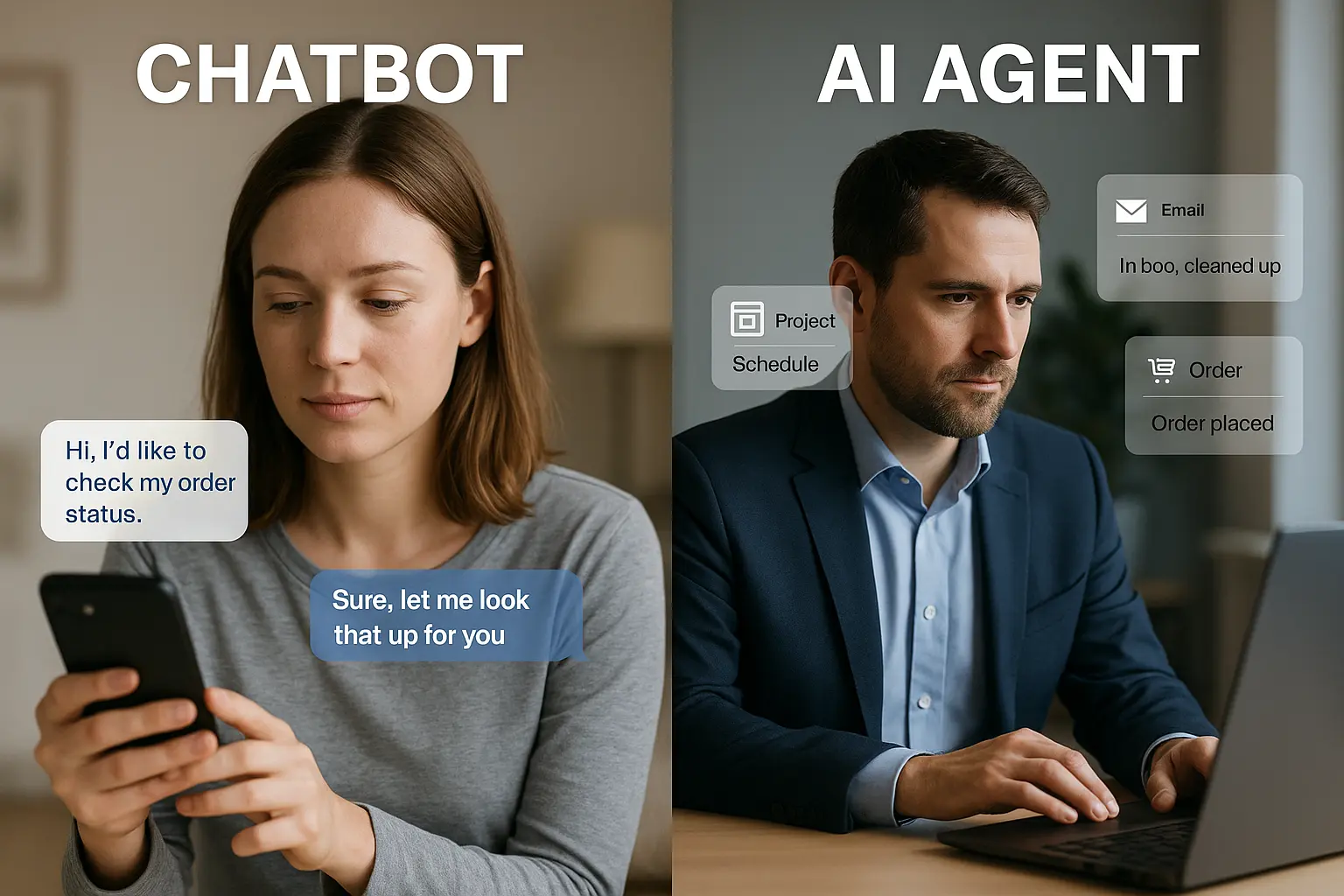
A chatbot is designed mainly to chat with you.
- You send a message
- It replies with an answer, suggestion, or follow-up question
- The interaction usually stays inside that chat window
Some chatbots are rule-based (buttons & scripts), others use LLMs (like GPT), but their core job is:
Chatbot = “Talk to the user and respond.”
Agent — Goal First
An AI agent is designed to achieve a goal and take actions, not just reply.
You say:
- “Clean my inbox and show me only important emails.”
- “Find 5 competitors, compare pricing, and send me a summary.”
- “Watch failed payments and message customers with a recovery link.”
The agent will:
- Understand your goal
- Plan steps
- Use tools/APIs/apps
- Act, check results, and adjust
Agent = “Work for the user and move the task forward.”
2. Mental Model: Q&A vs Perceive–Think–Act
How a Chatbot Works
Most chatbots operate in a single cycle:
- Take your message
- Understand what you’re asking
- Generate a reply (text, buttons, suggestion)
- Wait for your next message
Even if it’s extremely smart, it’s still reactive: it only does something when you send a message.
How an Agent Works
Agents run in loops instead of one-off turns:
- Perceive – Read data: emails, tickets, CRM, web pages, logs, user input
- Think – Decide: “What’s happening? What’s the goal? What should I do next?”
- Act – Use tools: send email, update record, call API, schedule meeting
Then it goes back to Perceive and repeats until the goal is done or a limit is reached.
This is why agents feel more like digital teammates than just chat windows.
Technical Insight: A chatbot is typically just an LLM generating text.
An agent adds:
- Tool calling (functions/APIs)
- Memory (context over time)
- Control loop (Perceive → Think → Act → repeat)
3. Capabilities: What Each One Is Actually Good At
Where Chatbots Shine
- Answering FAQs
- Explaining products and features
- Helping users navigate (“Which plan should I pick?”)
- Writing content on demand (emails, replies, blogs)
- Acting as tutors or guides (“Explain vectors like I’m 15”)
In short: conversation, explanation, and guidance.
Where Agents Shine
- Multi-step workflows with branching logic
- Pulling and joining data from multiple systems (CRM, billing, support, sheets)
- Doing things for you: updating, tagging, sending, creating, scheduling
- Running over time, not just in one chat (hourly, daily, event-based)
- Making decisions like “if A then B, else C,” without you micromanaging
In short: execution, orchestration, and follow-through.
4. Same Scenario, Two Very Different Behaviours
Let’s take one realistic scenario:
Scenario: Customer Wants a Refund
Customer message:
“Hi, I was double-charged for my last order. I want a refund.”
Chatbot Version
A chatbot might:
- Ask: “Can you share your order ID or email address?”
- Show the refund policy text
- Provide a link to a refund form or tell them to email support
- Maybe collect some details and create a ticket
It’s helpful, polite, and fast—but it doesn’t actually issue the refund.
Agent Version
An agent configured for refunds might:
-
Perceive
-
- Read the message
- Extract order ID, email, reason
-
Think
-
- Check internal rules: “Is this indeed a double charge?”
- “Is the order within the refund time window?”
-
Act
-
- Call billing API → confirm the duplicate payment
- Trigger a refund through payment gateway if rules allow
- Update the CRM and support ticket
- Send a confirmation message with refund details
- If anything doesn’t match rules, escalate to a human with all info filled in
Same starting point (a chat), but the outcome is different:
- Chatbot informs
- Agent resolves
5. Architecture: Under the Hood
Chatbot Stack (Simple)
- User interface (web widget, WhatsApp, Messenger, in-app chat)
- NLU / LLM (intent detection, response generation)
- Optional: pre-defined flows & FAQs
Data mostly flows like:
User → Bot → Text reply
Agent Stack (Richer)
- User interface (chat, dashboard, triggers, webhooks)
- LLM for reasoning & planning
- Tools / APIs: email, calendar, CRM, DB, ticketing, billing, browser, etc.
- Memory: what happened before, what actions were taken
- Controller / Orchestrator: runs loops, decides when agent should stop, logs everything
Data flows like:
User/Environment → Agent → Tools → Environment → Agent → … → Final result
<strong>Technical Insight:</strong>
Agents often produce structured outputs like:
A safe runtime executes these actions, rather than letting the model directly modify systems.
6. When Should You Use a Chatbot vs an Agent?
Choose a Chatbot When:
- You mainly need information and guidance
- Most questions are repetitive and answerable from a knowledge base
- You want a better front door to human support
- You’re not yet ready to let AI touch your systems directly
- Speed to launch is more important than deep automation
Good examples:
- Website FAQ bot
- Course counselor answering student queries
- Internal “how do I…?” assistant for employees
Choose an Agent When:
- There are repetitive workflows that follow clear rules
- Humans are currently copy-pasting between systems
- You want AI to actually do the work (not just suggest it)
- You have APIs or tools the agent can safely call
- You can define guardrails (what it can and cannot do)
Good examples:
- Lead-qualification agent that scores leads and updates CRM
- Billing agent that chases overdue invoices and schedules reminders
- Support agent that resolves simple tickets end-to-end
- Operations agent that updates sheets, dashboards, and daily reports
7. Can a Chatbot Become an Agent?
Yes—and this is exactly what many teams are building now.
You can think of it like this:
-
Start as a chatbot to:
-
- Understand user questions
- Collect data in conversation
- Act as the user-facing “front”
-
Attach an agent behind it to:
-
- Interpret the request as a goal
- Plan a sequence of actions
- Call tools and update systems
- Report back progress or results
To the end user, it still “feels like chat,” but under the hood you have a hybrid:
Chatbot for UX, Agent for execution.
8. Risks & Responsibilities with Agents
Because agents can take actions, the risk profile is higher than a simple chatbot.
Key things to control:
-
Permissions:
- What systems can the agent access?
- Read-only vs read-write?
- Approval flows:
-
-
Does a human review messages, payments, or updates before they go out?
-
-
Logging & monitoring:
-
Can you see every action the agent took and why?
-
-
Fail-safes:
-
Limits on number of messages, refunds, or changes per hour/day
-
For many teams, the right first step is:
Let the agent draft and propose actions,
and let humans review and approve them.
Then, over time, you selectively “unlock” safe, low-risk actions.
9. The Real Difference in One Sentence
If you remember only one line from this article, make it this:
A chatbot answers; an agent executes.
The chatbot’s job is to converse.
The agent’s job is to get the job done.
As AI infrastructure improves, you’ll see both working together:
- Chatbots on the surface for human-friendly interaction
- Agents underneath, quietly orchestrating tools and systems
Understanding the difference now will help you choose the right approach for your website, your product, or your workflow—and avoid over-promising what a “chatbot” can actually do.
Conclusion
Agentic AI is about more than smarter chatbots. It’s about AI systems that can perceive what’s happening, think through options, and act to move closer to a goal—over and over again.
By understanding the simple loop of Chat Agent and Real Agent, you can start to see where agentic AI fits into your work:
- What data can an agent observe for you?
- What decisions can it help you think through?
- What repetitive actions can it safely take on your behalf?
As tools and frameworks continue to improve, the real advantage will belong to people and teams who know how to design and supervise these agents effectively.
Stay tuned to BotCampusAI for more simple, practical explanations and real-world examples of how to use agentic AI in your projects and business.