Artificial intelligence has moved from “play with a model in a notebook” to shipping real products: chatbots, copilots, internal tools, research assistants, agents.
If you try to build any of these seriously, you hit the same problems:
- How do I manage prompts cleanly?
- How do I plug in tools, APIs, and databases?
- How do I add memory, retrieval, and multi-step workflows?
- How do I avoid rewriting the same glue code in every project?
That’s exactly where LangChain comes in.
This post explains, in plain language:
- What LangChain is
- The core concepts (chains, tools, memory, retrieval, agents)
- Real use cases where it shines
When you should—and shouldn’t—reach for it
- A simple roadmap to start learning it today
1. What Is LangChain, Really?
At a high level:
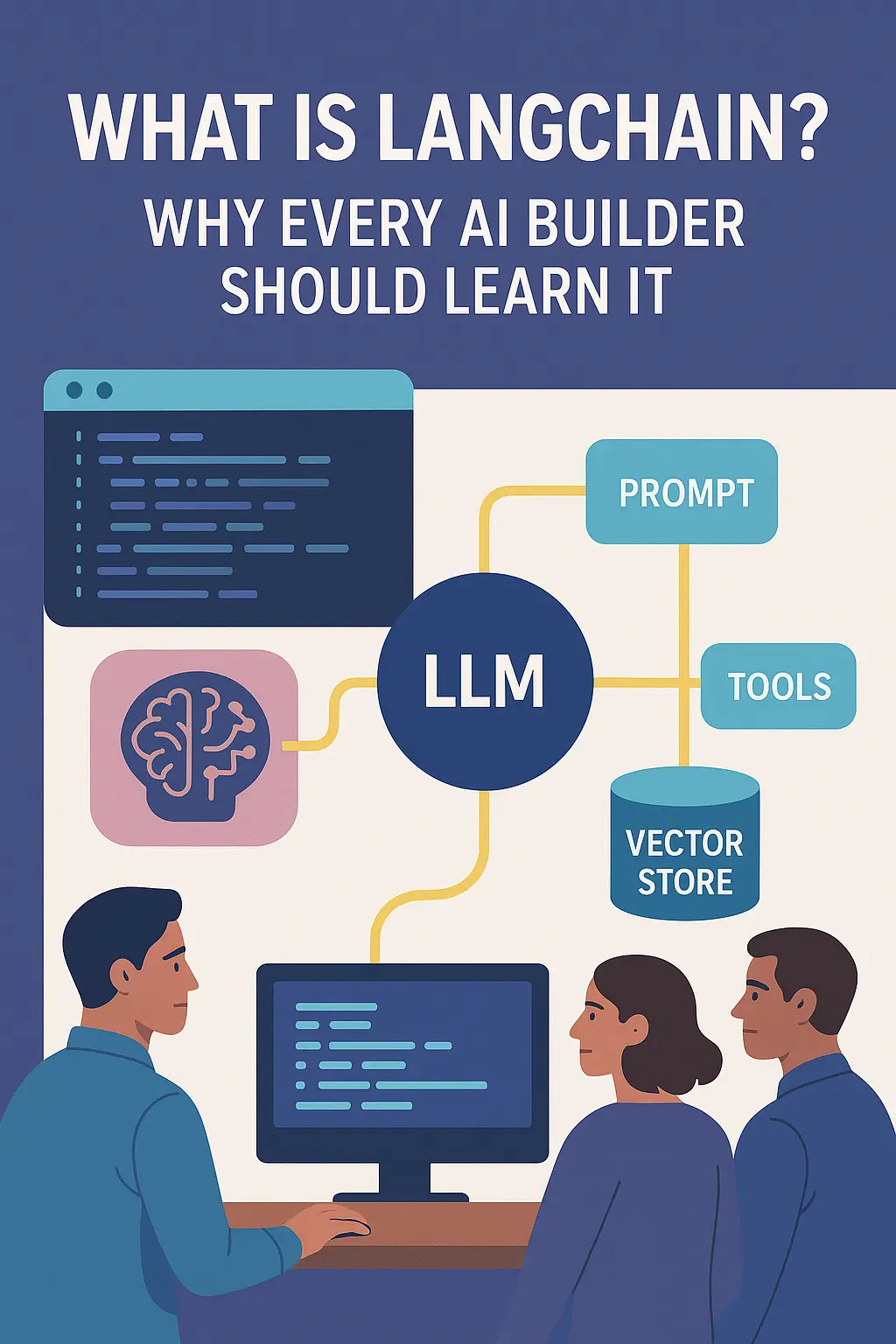
LangChain is a Python/JavaScript framework that gives you ready-made building blocks for building LLM-powered applications.
Instead of wiring everything from scratch, you get:
- Components for prompts, LLMs, tools, memory, retrieval, workflows
- Connectors to vector databases, APIs, file systems, cloud services
- Higher-level patterns like chains and agents
You still choose the model (OpenAI, Anthropic, local models, etc.),
but LangChain handles a lot of the orchestration and plumbing.
Think of it as:
“React for LLM apps” – not the model itself, but the framework that helps you structure and ship real applications.
Technical Insight:
Under the hood, modern LangChain revolves around the “LangChain Expression Language” (LCEL): a composable way to chain together LLM calls, prompts, retrievers, and custom functions like a pipeline. This lets you define complex flows in a few lines instead of writing imperative glue everywhere.
2. The Core Idea: Chains and Agents
LangChain is built around two key concepts:
- Chains – deterministic, step-by-step workflows
- Agents – goal-driven systems that decide which tools to use next
Chains
A chain is like a recipe:
- Take user input
- Fill a prompt template
- Call an LLM
- Parse the output
- Maybe store it or pass it to another step
Example chain:
- User question → retrieve relevant docs → LLM answers using those docs → return answer + sources.
You know exactly what happens at each step.
Agents
An agent is more flexible:
- You give it tools (search, calculator, database queries, APIs)
- You give it a goal
- The agent decides, step by step, which tool to call next based on current context.
Example:
“Analyze last month’s sales, then generate 3 recommendations.”
The agent might:
- Query your database
- Summarize results
- Call a plotting tool
- Generate recommendations
- Return a final answer
Technical Insight:
Chains = fixed graph of steps.
Agents = model-driven planner that chooses which “tool” node to execute at runtime. LangChain supports both, and you can mix them (e.g., an agent that calls a chain as one of its tools).
Want to Learn Ai Agents Here we are BotCampus-Workshop
3. Key Building Blocks Every Builder Should Know
To use LangChain effectively, you only need a handful of core primitives:
-
LLMs / ChatModels
Wrapper classes around providers (OpenAI, Gemini, local models, etc.). -
Prompt Templates
Reusable prompts with placeholders, like: -
Output Parsers
Ensure the model outputs valid JSON, CSV, enums, etc.—critical for reliable tool-calling and downstream code. -
Document Loaders
Helpers to ingest PDFs, HTML, Notion pages, Google Drive, etc. -
Vector Stores & Retrievers
Plug-ins to Pinecone, Chroma, Weaviate, FAISS, pgvector, etc. These power RAG (retrieval-augmented generation). -
Memory
Store conversation history or long-term state (e.g., user preferences) so your app feels consistent over time. -
Tools
Small functions (search, database query, HTTP request, code executor) exposed to agents.
Once you know these, you can read almost any LangChain example and understand what’s happening.
Technical Insight:
Most modern examples use runnables and |-style pipelines, like:
This functional style makes it easy to compose, debug, and reuse logic.
4. Real-World Use Case #1 – Chat with Your Documents
The most popular starter project:
“Upload PDFs / docs and chat with them.”
With LangChain, this pattern is almost “batteries included”:
- Use a Document Loader to read PDFs / text / HTML
- Split into chunks
- Store embeddings in a Vector Store
- Create a Retriever to fetch relevant chunks
- Wrap it in a QA chain:
-
-
User question → retrieve chunks → send to LLM with context → answer + sources
-
Why it matters:
- This exact pattern underlies many internal knowledge bots, support assistants, SOP copilots, and research tools.
- LangChain gives you standardized components instead of one giant, messy script.
Technical Insight:
The classic pattern is:
When called, the chain automatically runs retrieval then passes both question + context into the LLM.
5. Real-World Use Case #2 – Multi-Step Workflows & Automations
LangChain is excellent when you need multiple LLM steps:
Examples:
- Summarize a document → extract key entities → write them into a database
- Analyze customer feedback → classify sentiment → route to the right team
- Take meeting transcript → generate summary → tasks → calendar suggestions
Instead of writing one giant prompt, you:
- Break logic into smaller chains that each do one clear thing
- Connect them with LCEL so data flows cleanly
Benefits:
- Easier to test each step
- Easier to debug when output is wrong
- Easier to swap models or logic later
Technical Insight: You can unit-test individual chains by feeding them mock inputs and checking outputs—something that’s extremely painful if everything is hidden in “one prompt to rule them all.”
6. Real-World Use Case #3 – Tool-Using Agents
If you’re building AI agents that can:
- Call APIs
- Query databases
- Use a browser
- Run code
- Integrate with your existing tools
LangChain’s agent tooling is a strong starting point.
Example scenarios:
-
A support agent that can:
- Look up orders
- Trigger refunds (with guardrails)
- Update tickets
-
A research agent that:
- Searches the web
- Scrapes content
- Writes structured summaries
You define small @tool functions and let the agent decide which one to call when.
Technical Insight: Tools are usually just Python functions decorated with metadata. LangChain automatically generates the JSON schema for the model’s function-calling interface, so your tools become “first-class citizens” the LLM can reason about.
7. Why Every AI Builder Should Learn LangChain
You could write all of this in raw Python with the OpenAI SDK and a bunch of your own classes.
But LangChain gives you a big advantage:
-
Speed of Prototyping
-
- Spin up POCs in hours, not weeks.
- Most common patterns (RAG, agents, chains) are already solved problems.
-
Shared Vocabulary
-
- When you say “retriever,” “tool,” “memory,” “agent,” other LangChain users know exactly what you mean.
-
Ecosystem & Integrations
-
- Tons of ready connectors: vector DBs, file types, external APIs.
- You don’t rewrite the same “load documents + embed + store” code every project.
-
Maintainability
-
- Chains/LCEL encourage clean composition instead of spaghetti prompts.
- Easier for teams to collaborate and review.
-
Portability of Ideas
-
- Even if you later move to another framework (LlamaIndex, custom stack), the mental model you learn from LangChain—prompts, retrieval, tools, agents—stays incredibly valuable.
8. When You Might Not Need LangChain
LangChain is powerful, but it’s not mandatory for every project.
You might skip it if:
- You’re just calling an LLM once or twice (simple script / notebook).
- You don’t need retrieval, multiple tools, or multi-step flows yet.
- You want a minimal dependency and are comfortable writing your own wrappers.
In those cases, using the raw SDK might be simpler.
But as soon as you:
- Need RAG
- Need more than one step
- Need to integrate multiple external systems
- Want to ship a robust LLM-backed product
…learning LangChain pays off very quickly.
9. A Simple Roadmap to Learn LangChain
Here’s a practical learning path:
- Start with basic LLM calls Use LangChain just as a thin wrapper around your favorite provider. Get comfortable with models and prompt templates.
- Add retrieval (RAG) Load a few PDFs, store them in a vector DB, and build “chat with your docs.” This teaches you loaders, text splitters, embeddings, vector stores, and retrievers.
- Introduce chains Build a multi-step pipeline: input → classify → choose prompt → answer. Use LCEL (`|` pipelines) to structure it.
- Experiment with tools & agents Create a few simple tools (calculator, web search, database query) and give them to an agent. Observe how it chooses which to use.
- Productionize Add logging, evaluation (quality checks), caching, and basic tests. Wrap your chain in an API endpoint or background job.
If you learn just enough LangChain to do these 5 steps, you’ll be productive on almost any LLM project.
Conclusion
LangChain doesn’t replace good product thinking, prompt design, or data strategy.
But it does give you:
- A clean, battle-tested way to structure LLM apps
- A huge ecosystem of integrations and building blocks
- A shared vocabulary and set of patterns that every serious AI builder should know
Whether you’re prototyping your first AI assistant or designing complex agentic systems, learning LangChain is one of those skills that keeps paying off with every new project.
For more guides on agents, RAG workflows, and real automation examples built on LangChain and other frameworks, keep an eye on
BotCampusAI— we’ll keep breaking it down in practical, builder-friendly language.